Subgrade is Now an App
We know the reality of civil construction: your work doesn't stop just because the 4G signal drops out. Between remote highway projects, deep trenches, and regional black spots, relying on a standard web browser to manage your daily compliance and operations can be frustrating.
That’s why this week, we are thrilled to announce a massive infrastructure upgrade to Subgrade.
Starting today, Subgrade is officially an installable Progressive Web App (PWA). You get the speed, reliability, and push notifications of a native mobile app, without having to mess around with App Store downloads or updates.
Here is what is live on your account right now:
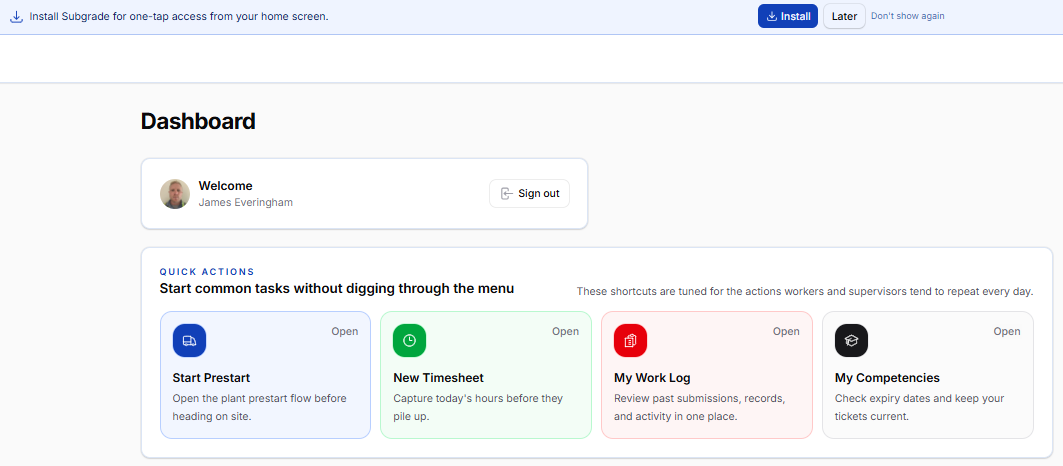
📱 Install directly to your Home Screen You no longer need to type our URL into your browser every day. You can now install Subgrade directly to your phone, tablet, or desktop. It lives on your home screen right next to your other apps, launches instantly in full screen without the clunky browser search bar, and keeps you logged in.
On Android/Desktop Chrome: You’ll see a banner at the top of your dashboard inviting you to install the app. Just tap "Install."
On iOS/iPhone: Open Subgrade in Safari, tap the 'Share' icon at the bottom of your screen, and select "Add to Home Screen".
⚡ Instant Loading & Smart Offline Resilience We’ve completely overhauled how Subgrade loads data. Once installed, the app aggressively caches its core components to your device. This means even if you have a terrible connection, the app will open almost instantly. If you drive completely out of phone reception, you won't be hit with a broken browser error screen—the app will gracefully let you know you're offline and keep the lights on until your connection returns.
🔔 Push Notifications You can now receive instant alerts right to your device, even when Subgrade is closed. Whether it’s an urgent safety alert, a timesheet approval, or a reminder that an SDS is expiring, you will get a standard notification on your lock screen.
To turn this on, head to Settings > My Notifications in the app and tap "Enable push notifications."
🔜 Coming Next: Full Offline Data Capture This upgrade sets the foundation for our most requested feature: true offline form submission. We are currently testing the ability for field workers to fill out and submit Timesheets, Prestarts, and Shift Reports while in complete airplane mode, which will then magically sync to the server the second they drive back into phone reception. Stay tuned for updates on this in the coming weeks!
Log in today to install the app and enable your push notifications.