Skip to content

For civil contractors

Civil Suite

Site, fleet, people, money and projects on one ledger.

Capture the shift in the field, run payroll from approved timesheets, and watch every dollar of labour, plant and fuel land on the job while the dirt is still moving.

What the Civil Suite runs

Timesheets & prestarts

Crews clock on, sign the prestart and log plant hours from their phone, with or without signal.

Crews & allocations

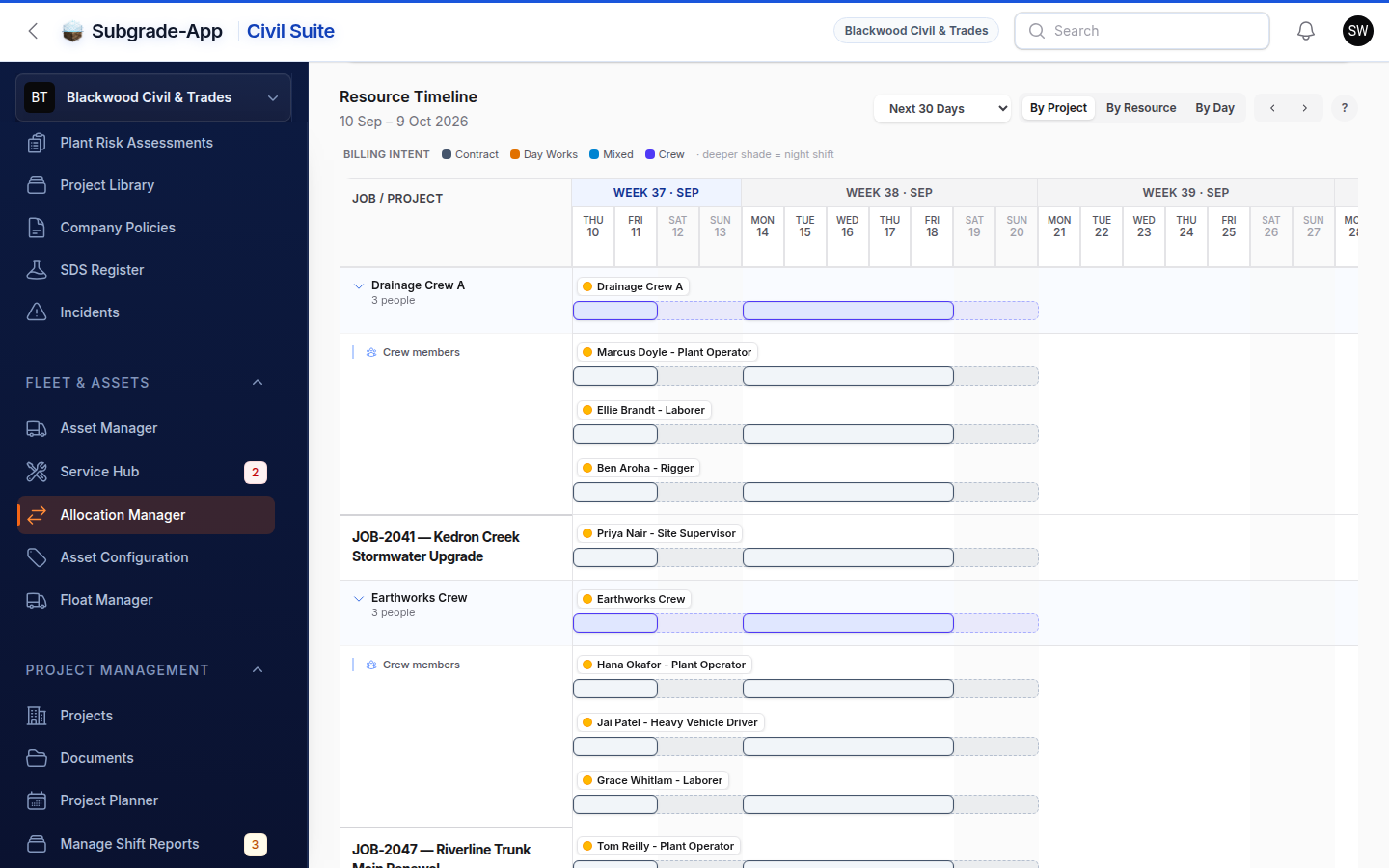
Plan who and what goes where tomorrow, and see the clashes before the ute leaves the yard.

Payroll Hub

Approved hours become a pay run export, with allowances and leave already applied.

Budget & job cost

Labour, plant, fuel and supplier costs post to the job budget as they are approved.

Day works dockets

Signed on site, stored as billing evidence, and never lost in a glovebox.

Safety & training

Competencies, inductions, SWMS and incidents, with expiry warnings before the site gate finds them.

Inside the Civil Suite

Everything a civil contractor runs, on one ledger.

Site, yard, office, finance and PM run on the same connected platform. Five domains, one source of truth, and every number on the dashboard can be opened to the rows behind it.

Operations

The Dirt

What's happening on site, right now.

Capture every hour, every signature, every shift event from the field — without paper, without rekeying, without the 9pm phone call. A crew is one row on the board, a shift report finalises with photo evidence attached, and a rain day is recorded with what it cost.
  • Dockets
  • Timesheets
  • Prestarts
  • Email & SMS notifications
  • Global Broadcasts
  • Shift reports & crew log
  • Crews
  • Incidents from the field
  • Delay register
  • Offline drafts

Asset Management

The Fleet

Every machine accounted for, every service caught.

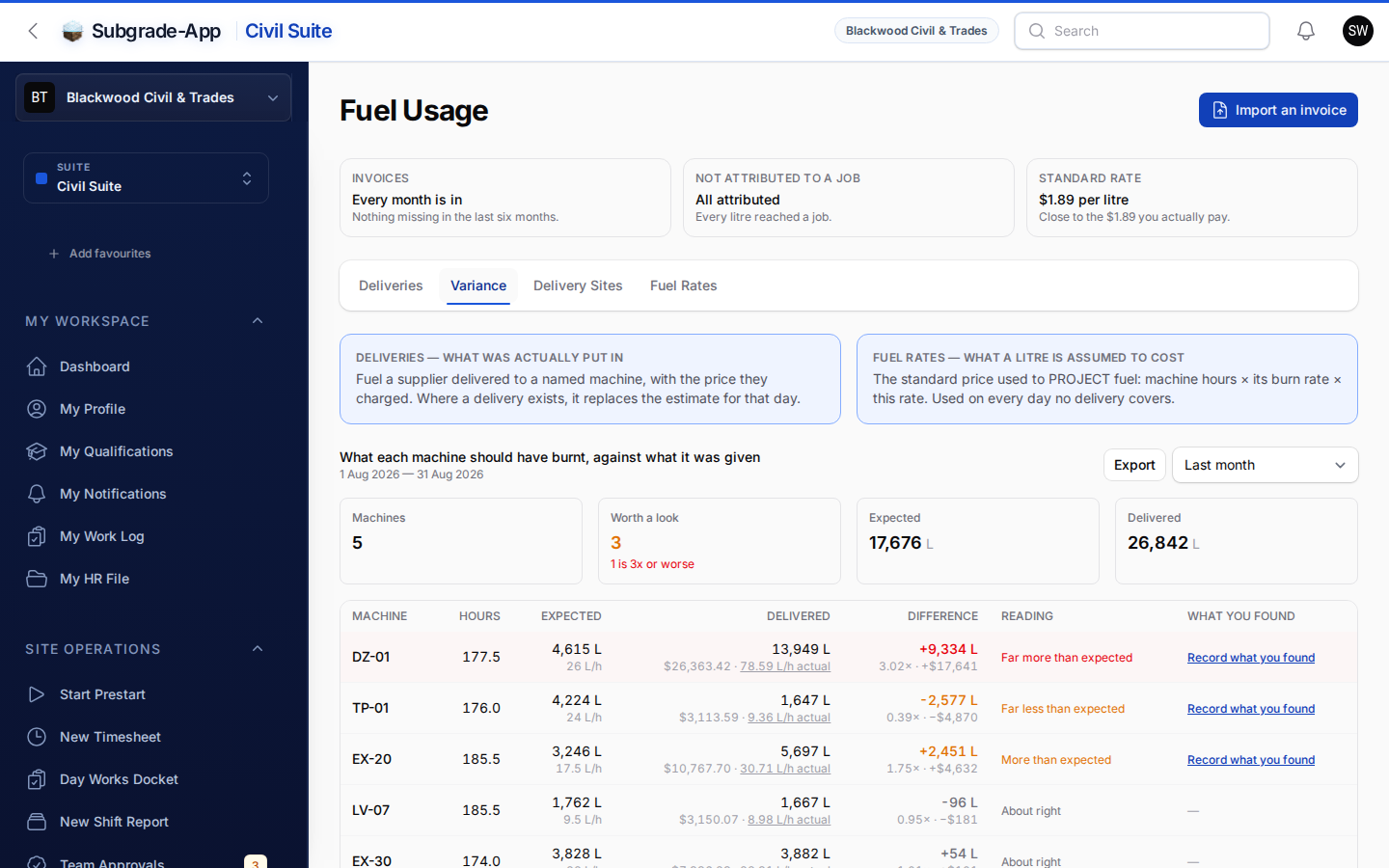
A live register of plant, vehicles, and attachments. Service intervals trigger from real prestart hour-meters, failed checks open defect tickets that escalate, and the fuel page says what each machine should have burnt against what the supplier put in it.
  • Maintenance Hub
  • Defects
  • Registrations
  • Weekly km check-ins
  • Allocation Manager
  • Fuel Usage & variance
  • Checklist library
  • Certificate of currency
  • Idle value

HR & Safety

The People

Tickets, training, and rosters in one register.

Competencies that lead with who cannot work today, one training register with inductions on it, an Insurance Register that knows what cover you must hold, and roles grouped by suite — your entire workforce, audit-ready.
  • SDS Register
  • Performance Reviews
  • Roster Calendars
  • Allocation Manager
  • Competency Tracker
  • Custom Training Modules
  • Leave Management
  • Workers Compensation
  • Project Induction Tracker
  • Training register
  • Insurance Register
  • Client onboarding portal
  • Roles by suite

Payroll, Billing & Budget

The Money

Run payroll, bill subbies, and watch the burn — all in one ledger.

Approved timesheets flow into a Payroll Hub that answers "can I close this cycle?" first — hourly, salaried, or day-rate, with travel, allowances, penalties, public holidays and rain pay worked out, and corrections allowed until the run is processed. Subcontractors log their own work and it becomes an RCTI at month-end. Every dollar of labour, plant, fuel and overhead then posts to the job ledger, and the Budget Overview says what the company is making before it says what it is spending.
  • Pay runs & exports
  • Hourly, salary & day-rate
  • Award allowances & penalties
  • Travel allowance engine
  • Public holidays & rain pay
  • Subcontractor RCTI invoicing
  • Payroll Hub
  • Pay levels & Saturday rates
  • Distant travel review
  • Budget Overview
  • Project P&L
  • Fuel, plant & overhead costs
  • Re-cost preview

Project Management

The Projects

Compliance, plans, and reports the way auditors expect them.

Run every project against versioned SWMS and policies, with the latest drawings in your crew's pocket, a contract book that tracks progress claim by claim, and a delay register that turns rain days and lost time into an EOT and a claim pack.
  • Project & Client management
  • Versioned compliance docs
  • SWMS
  • Report Builder
  • Project Planner
  • Digital Plan Room
  • Day Works Dockets
  • Float Tracker
  • Contract book & progress
  • EOT & claim pack
  • Works Report with crews

Two surfaces. One platform.

The Field meets the Office.

Same data, two completely different experiences. Crews tap, sign, and move. Schedulers plan, allocate, and approve. Subgrade is built natively for both.

The Field

Tap. Sign. Done.

Built for supervisors, operators, technicians and subbies on the dirt. Big tap targets, glove-friendly, and drafts that keep working when the signal drops.

  • Timesheets, prestarts and shift reports that save offline and sync when you are back in range.
  • Photo evidence that says who took it, and a crew log written once for the whole crew.
  • QR-code sign-on for subbies and visitors — no login required.

The Office

Plan. Allocate. Approve.

Built for schedulers, payroll and managers in the office. A Payroll Hub that answers the cycle first, drag-drop allocation with crews, live audit trails, and exports that agree with the ledger.

  • Payroll Hub: what blocks the close, what is waiting on whom, then finalise.
  • Live audit trail on every approval, signature, and change.
  • A timesheet can be corrected until the run is processed, and the worker is told.
Jobsite-tested

Four workflows that pay for the seat.

From the prestart to the pay run, without rekeying

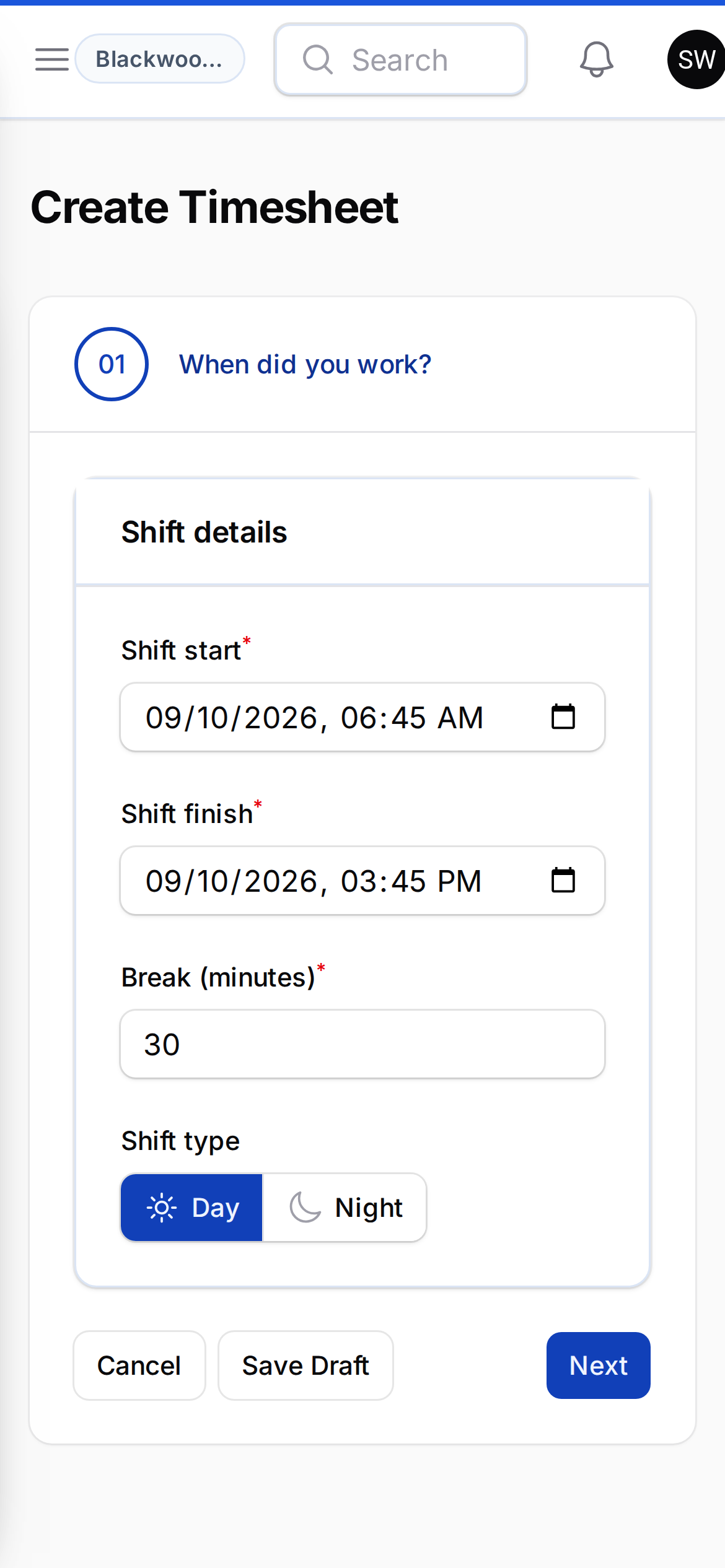
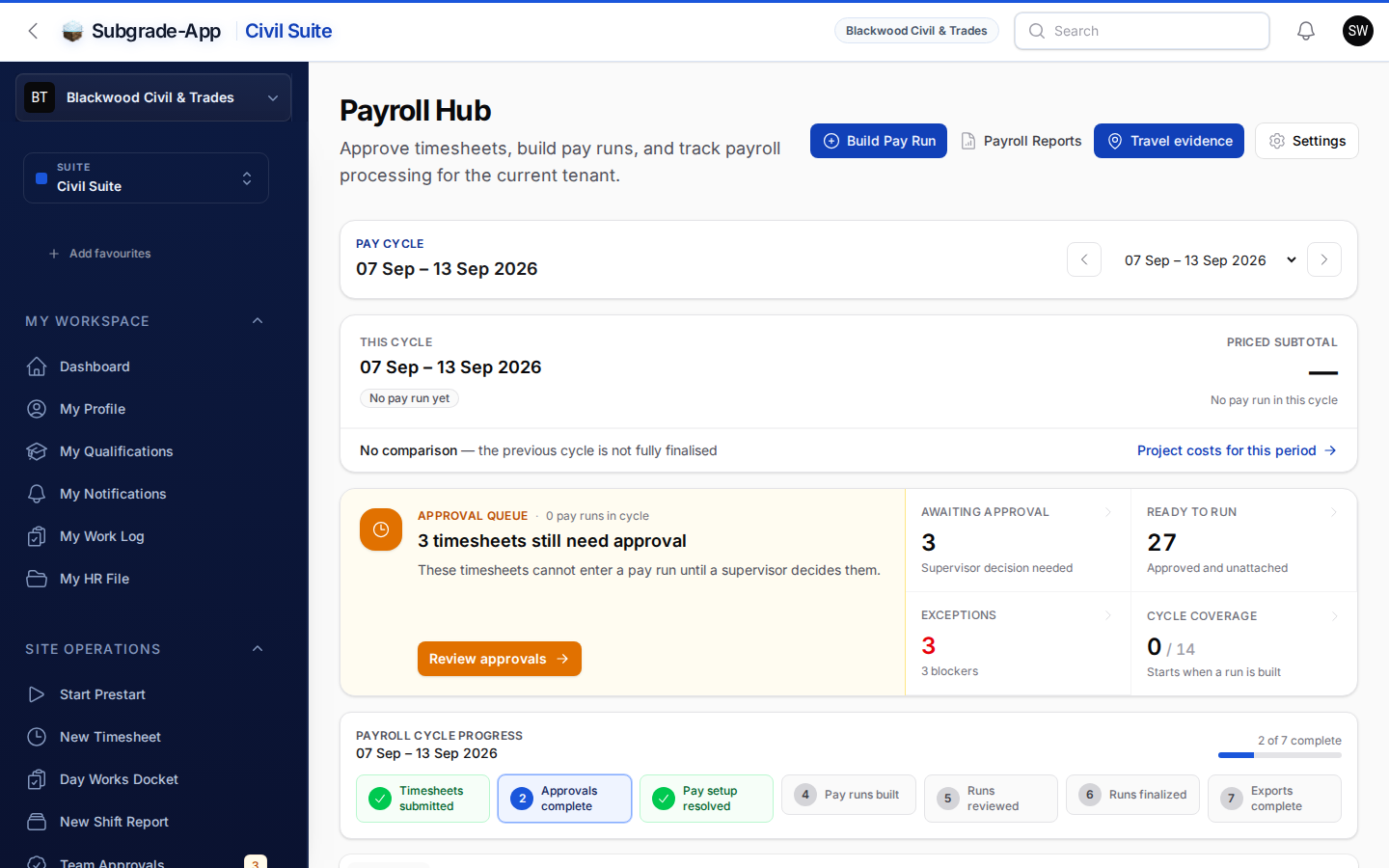
The operator does the prestart and the timesheet on a phone, offline if it has to be. The supervisor approves. The Payroll Hub then answers the one question payroll actually has — can I close this cycle? — and lists exactly what is blocking it. Corrections are allowed until the run is processed, the worker is told when they are paid, and every approved hour posts to the project ledger the same day.

Timesheet entry on a phone
Payroll Hub showing the current cycle

Job in, technician out, invoice paid

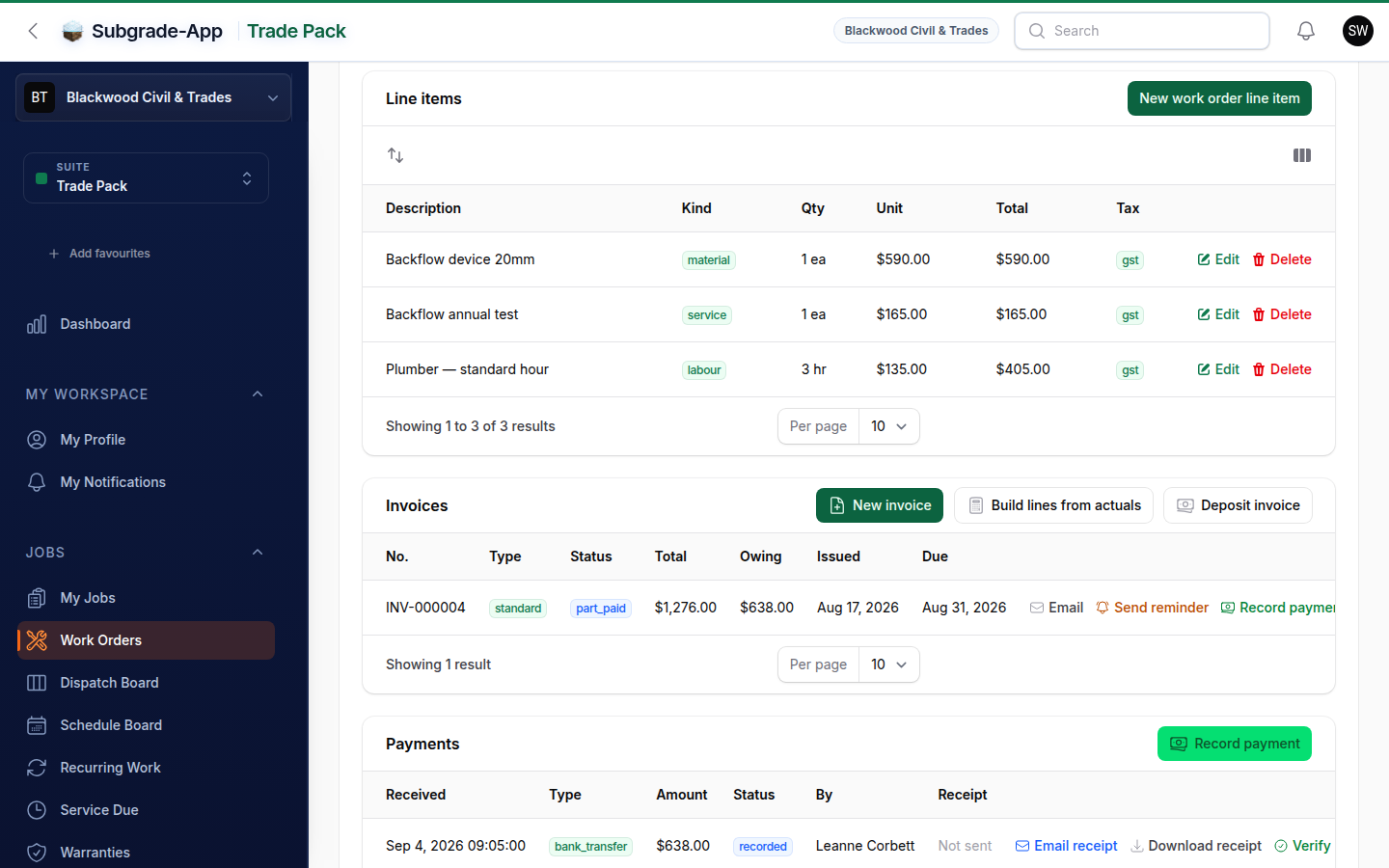
Raise the work order against a customer from the book, price it from your own price book, and drop it on the dispatch board. The technician sees it in My Jobs, adds photos, notes and lines from the van, and marks it done. It lands in the ready-to-invoice queue, the invoice goes out on your letterhead, and receivables age it at 30, 60 and 90 days until it is paid.

Trade Pack work order with its invoice

Know the burn while the dirt is still moving

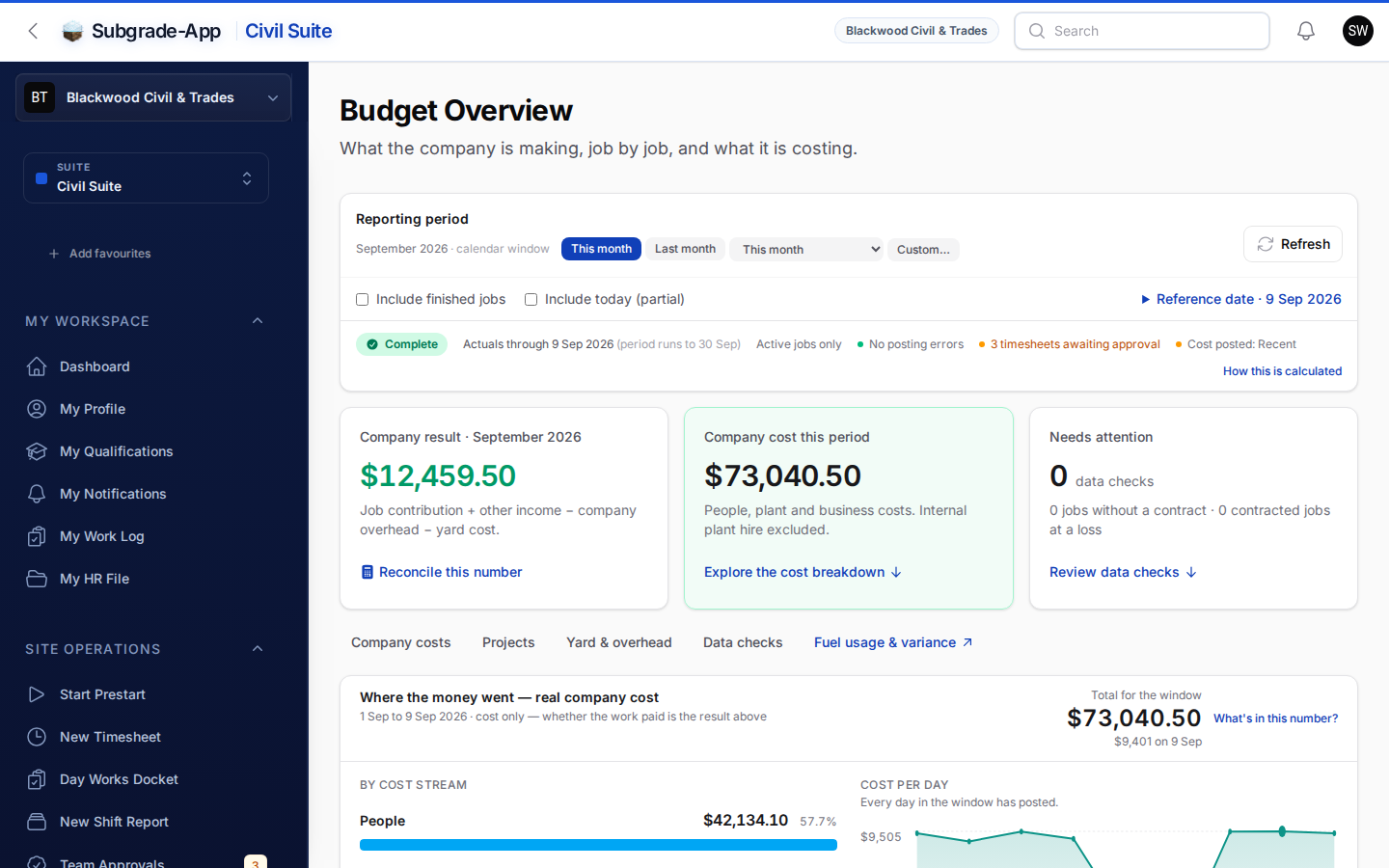
Labour, plant, fuel and overhead post to one project ledger as they are approved. The Budget Overview leads with what the company is making, then where it is going, which job is bleeding and what has not been booked yet. Fuel variance shows what each machine should have burnt against what the supplier delivered, with six months of history and thresholds you can argue with.

Budget Overview Fuel Usage variance by machine

A five-person crew is one row on the board

Plan the week as tasks, spawn a crew from a task, drag a worker into it or a whole crew onto another job. The Works Report says who belongs to which crew, and a crew can be sent its shift details in one action. When the plan drifts from what was allocated, the planner says so.

Project planner with crews

The rest of the toolkit

Everything else the office stops chasing.

The workflows above are where the money moves. These are the registers and records that used to live in a folder of emails.

Subbies & insurance

Subcontractors log work against the job by QR link with no paid seat; you approve it and it becomes an RCTI at month-end. Their certificate of currency arrives by link, and the register checks cover before approval and again at payment.

Safety that leads with who cannot work today

Competencies open on the people who are not allowed on site this morning. Prestarts come from a checklist library, a failed check becomes a defect that escalates, and inductions, toolbox talks and signatures sit on one training register.

Day Works Dockets

Sign-on-glass dockets with work items priced from your rate book, a filing queue that says what is still owed, and status tracking the client can see. Fewer disputes, invoices that keep moving.

Broadcasts

One message across in-app, email and SMS to everyone, one crew or a hand-picked list. Attach the documents, schedule it, and keep the record of who got it and how.

Workers Comp

Every claim from lodged to closed: appointments, medical certificates, capacity, return-to-work, disputes and running cost, with reminders before a certificate lapses.

Audit trail everywhere

Every approval, signature and status change is recorded against who did it and when. No more wondering who touched what.

Rapid rollout. Stand up new projects and workspaces fast, with your structure rather than a generic template.
Approvals that flow. Supervisor approvals, client sign-offs and payroll validations stay connected end to end.
QR sign-on. Subcontractors and visitors sign SWMS and toolbox talks from a QR code, without a user account.

Run the numbers

What your fragmented stack is costing you.

Plug in your crew size and plant count. The numbers move live — no form, no hand-over to a sales rep, just the maths.

Money back in your pocket
saved every year — with Subgrade.
/ month vs you're paying for fragmented apps
Bigger crews, bigger savings
Let's design a plan that fits.

Above 80 users we move to a custom Enterprise package. Your fragmented stack alone is currently burning per month.

Fragmented Stack
/ mo
  • Timesheet app
  • Safety / prestart app
  • Fleet / asset app
With Subgrade
/ mo
Custom pricing

Flat-rate package — no per-asset surcharge, no per-feature add-ons. Plant tracking, prestarts, dockets, payroll, and compliance all included.

Annual Saving
/ yr
Significant

Equivalent to one recovered Day Works docket a fortnight, or a single Concierge Onboarding paying for itself within months.

Subgrade pricing is package-based — Starter ($99), Small Crew ($249), Contractor ($499), Civil Group ($849). Competing-app estimates assume $35/user and $40/asset per month. Your real spend may be higher once contracts, integrations, and admin time are counted.

Lock these numbers in — request a demo Talk to us about Enterprise

Pricing

Civil Suite plans

Monthly, in AUD, excluding GST. Compare every suite, add-on and credit pack

Civil Suite

A paid seat reaches every suite your workspace holds.

  • Starter

    For a small company or sole trader. Up to 5 users.

    5 paid seats · extra seats $19 each · 50 SMS a month · 25 AI Reads a month

    $149 / month

    Get started
  • Small Crew

    For a company with up to 15 users

    15 paid seats · extra seats $19 each · 250 SMS a month · 50 AI Reads a month · Tender Portal with 10 credits a month

    $299 / month

    Get started
  • Contractor

    For contractors with up to 45 users

    45 paid seats · extra seats $19 each · 500 SMS a month · 150 AI Reads a month · Tender Portal with 25 credits a month

    $599 / month

    Get started
  • Civil Group

    For larger companies of up to 80 users

    80 paid seats · extra seats $19 each · 1,000 SMS a month · 300 AI Reads a month · Tender Portal with 50 credits a month

    $999 / month

    Get started

Get started

One workspace. Three suites. Built by site people.

Civil Suite, Trade Pack and Tender Portal on one login. Hosted in Australia, supported in your timezone.

100% Australian Made, Owned & Hosted