The New SDS Register, Streamlined Navigation, and Better Dockets
Product Update: The New SDS Register, Streamlined Navigation, and Better Dockets
In our latest sprint, we focused heavily on reducing friction across the platform. We’ve shipped a major new compliance feature to keep your sites safe, overhauled how asset profiles are displayed, smoothed out the Day Works dockets workflow, and aggressively decluttered the navigation menu.
Here is a look at everything new in this update.
🧪 New Feature: The SDS (Safety Data Sheet) Register
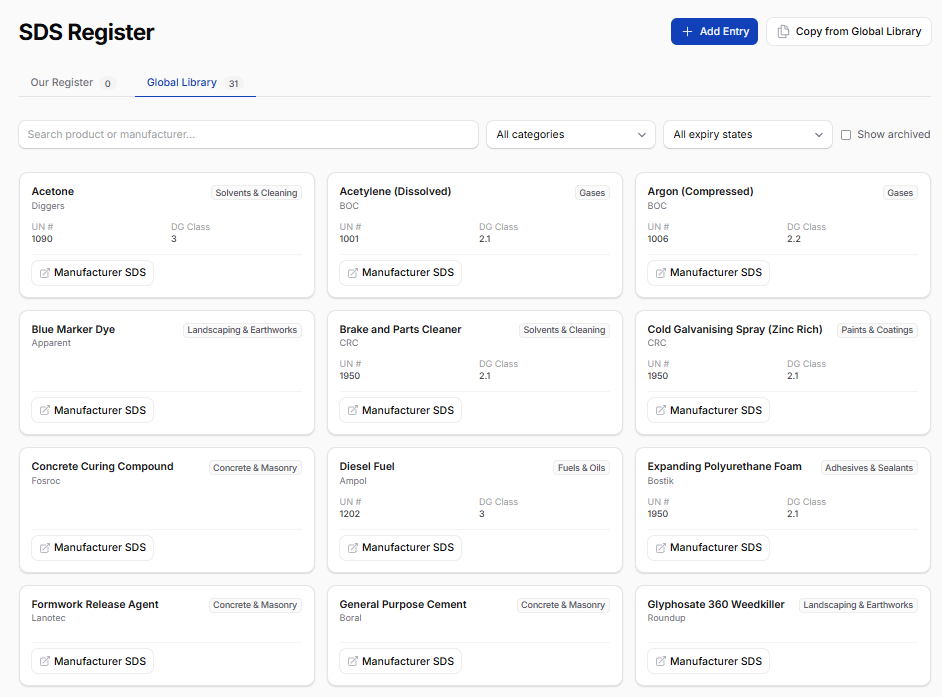
Managing chemical safety data sheets is a notorious compliance headache. We’ve built a complete SDS Register to give your team a single, reliable place to manage chemicals on site.
Dual-Layer Library: The system features a Global Chemical Library (pre-seeded with common civil construction chemicals) alongside your own Tenant Register. You can easily pull standard chemicals from the global list or add your own custom entries.
Built for the Field: Field workers get a clean, highly searchable card grid optimized for mobile phones—no clunky tables. One tap opens the PDF. Safety managers get the same view, but with permission-gated controls to edit, archive, and manage records.
QR Code Generation: Managers can instantly generate and print QR codes for specific chemicals. Stick them on chemical cages or fuel tanks for instant mobile access to the safety sheet.
Automated Expiry Tracking: SDS documents legally expire every 5 years. Our system automatically calculates this based on the issue date and sends a digest email and in-app notification to your safety managers 30 days before a sheet expires.
📝 Day Works Dockets: Smoother Workflows & Better Exports
We’ve shipped a solid round of improvements to the Day Works Dockets module to make logging and exporting daily work faster and more reliable.
Redesigned Signature Modal: Capturing a signature is now much cleaner. The modal features three straightforward tabs (Existing Contact, New Contact, One-Off Contact) sitting right above the signature pad, keeping the experience consistent.
Cleaner View Page: We replaced the clunky "disabled form" view with a dedicated, clean summary layout. You can now easily read work items, equipment, float details, notes, and the captured signature block at a glance.
Bulk Exports & PDF Downloads: You can now bulk-export selected dockets to a CSV or download them as a ZIP file of PDFs. We also added a quick-download button to every row on the dockets table so you can grab a PDF without opening the record.
Bug Squashing: We fixed several frustrating bugs, including signature modals failing to load, date-parsing errors on the history tables, and cross-tab validation issues that were blocking form submissions.
🚜 Asset View: A Complete Audit & Overhaul
Over the past few weeks, we did a deep dive into the Asset View pages across Plant, Vehicles, and Equipment. Previously, these three asset types had slightly different layouts and independent bugs. We’ve completely unified them.
The New Asset Profile: The Overview tab has been redesigned with a clean profile card showing the asset image, status, service health, current project allocation, and make/model immediately on page load.
Smarter Compliance Warnings: The Legal Requirements section now features "Due Soon" warning badges for registrations and insurances expiring within the next 30 days. We also fixed currency formatting bugs for registration costs.
Unified Health & Gallery: Whether you are looking at an excavator or a fleet truck, the Service Vitals and Photo Galleries now look and behave exactly the same.
Under the hood: We removed hundreds of lines of duplicated code. Going forward, if we add a feature or fix a bug on a vehicle profile, it instantly applies to plant and equipment, too.
🧭 Cleaner Navigation, Less Clutter
When a sidebar grows too long, it becomes noise. We took a hard look at the dashboard's navigation groups and consolidated related items to reduce cognitive overload.
Finance & Billing: Subscriptions, Orders, and Payments are now cleanly organized as tabs within a single Billing page.
Project Management: Projects and Clients have been unified into one page. Similarly, Project Documents and Document Types now live together under a single Documents Hub.
Fleet & Assets: Asset Defects has been folded into the Service Hub, giving mechanics one place for both service history and defect reporting. Asset Categories and Service Profiles are now unified under Asset Configuration.
Budget Tracking: What used to be eight separate navigation items is now just three: Overhead, Compensation, and Asset Costs.
The result is a leaner, more intuitive sidebar that surfaces the right information without burying you in options. All your existing functionality is still there—it's just much easier to find!